
O site do cliente tinham alguns textos que eram muito extensos e, num layout de coluna, variavam muito de tamanho. Decidi adaptar o que já havia feito no Divi, ao incluir um botão Leia Mais (https://blog.amandadelavra.com.br/modulo-texto-com-botao-leia-mais/), mas dessa vez o site foi desenvolvido no Elementor. A coluna começava com 2 módulos de imagem, depois tinha um título e, aí sim, o texto e o botão Leia Mais. Dentro do texto era pra ter uma primeira parte em destaque e uma segunda parte menor. O último módulo a ser usado para o texto e o botão é um módulo HTML (o CSS e o jQuery podem ir em um desses módulos também).
<div class="read-more-content">
    <div>
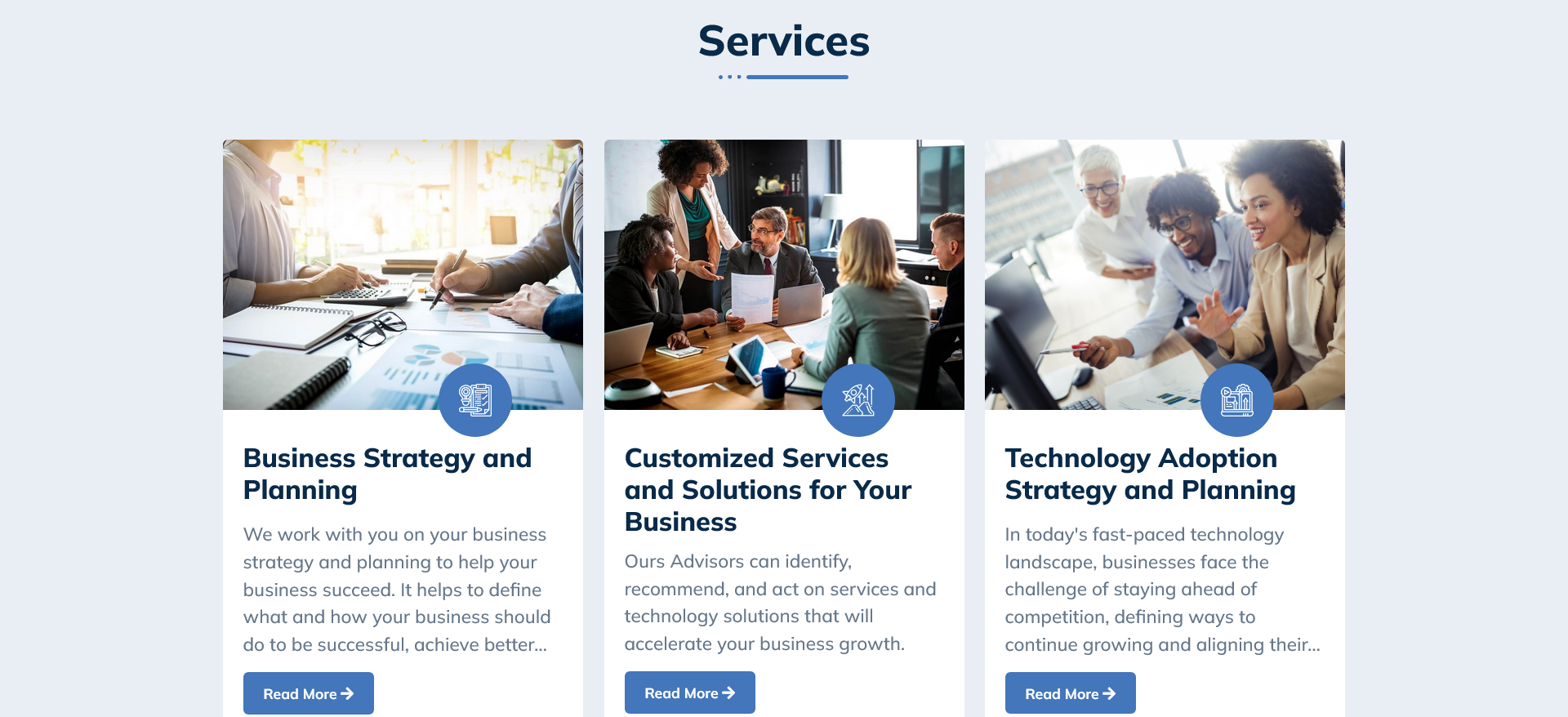
        <p>We work with you on your business strategy and planning to help your business succeed. It helps to define what and how your business should do to be successful, achieve better<span class="dots">...</span> <span class="more">results and reach its goals.</span></p>
    </div>
    <div class="more">
        <p>It will give you the opportunity to take some time to work on your business rather than in your business. When you develop a business plan for your business, marketing capability, or digital initiatives, you have the opportunity to think about what you’re going to do with the capital you are investing, and how you will achieve business goals while better understanding the market, target customers, competitors and risks associated with business operations.</p>
        <p>We can assist in the facilitation of brainstorming and workshop sessions and definition of business strategies, which can shape a direction to your business, and help you to elaborate a business plan to put the strategies into action. Take into consideration vital aspects that will help save time and money. Alternatively, we can assist in the review of existing business plans.</p>
        <p>At the end you will get a comprehensive business plan for your business, which includes some financial planning components.</p>
    </div>
    <a class="read-more-link" data-index="1" href="#tema-texto1">
        <button class="read-more-btn">Read More <i aria-hidden="true" class="fas fa-arrow-right"></i></button>
    </a>
</div>

<div class="read-more-content">
    <div>
        <p>Ours Advisors can identify, recommend, and act on services and technology solutions that will accelerate your business growth.<span class="dots"></span></p>
    </div>
    <div class="more">
        <p>Team of experts who have market knowledge to carry out the entire study of the current structure, identify the needs of your business, design and propose customized improvements, in addition to planning and implementing technological solutions.</p>
        <p>We offer specialized consultants who bring the most modern practices in the market to improve the operations of your company.</p>
        <p>Tailor-Made Development systems architecture, integration between softwares, midwares and RPA (Robotic Process Automation) development. We have a diverse team with many skills ready to deliver the many IT solutions.</p>
        <p>We work on definition, assembly, support, and monitoring of environments, offering complete end to end solutions.</p>
        <p>IT Support 24x7 monitoring the high availability of systems and services reducing the downtime of applications, in on-premises data centers, private clouds and/or public clouds.</p>
    </div>
    <a class="read-more-link" data-index="2" href="#tema-texto2">
        <button class="read-more-btn">Read More <i aria-hidden="true" class="fas fa-arrow-right"></i></button>
    </a>
</div>

<div class="read-more-content">
    <div><p>In today's fast-paced technology landscape, businesses face the challenge of staying ahead of competition, defining ways to continue growing and aligning their<span class="dots">...</span> <span class="more">strategies with rapidly evolving markets. A well-crafted technology adoption strategy can help to enable business strategy, develop business capabilities to improve efficiency and capacity, and achieve business growth.</span></p></div>
    <div class="more">
        <p>Our advisory service provides guidance to technology adoption, offering comprehensive capabilities in strategy and planning. Our approach is rooted in understanding the unique needs and goals of each client, enabling us to tailor technology roadmaps that drive investment in technology to enhance efficiency and deliver business growth.</p>
        <p>By partnering with us, your business gains a strategic ally committed to maximizing the impact of technology on your small business. Our technology adoption strategy and planning service empower you to embrace innovation with confidence.</p>
        <p>At the end you will get a technology roadmap for your business, which includes a high-level budget to support investment decision.</p>
    </div>
    <a class="read-more-link" data-index="3" href="#tema-texto3">
        <button class="read-more-btn">Read More <i aria-hidden="true" class="fas fa-arrow-right"></i></button>
    </a>
</div>
Uma dificuldade que eu tive foi que eu queria que o link do botão mudasse. Primeiro era pra ele direcionar para o texto, mas ao se tornar Leia Menos, deveria direcionar para a primeira imagem da coluna. Para isso, cada imagem ganhou uma ID como #tema-imagem1 e, no elemento a, coloquei a propriedade data-index com os valores 1, 2 e 3 respectivamente.
Em segundo lugar, vem o código CSS:
/*Esconder texto adicional*/
.more {
    display: none;
    font-size: 14px;
}
span.more {
    font-size: 18px;
}
@media (max-width: 1024px) {
    span.more {
        font-size: 16px;
    }
}
@media (max-width:767px) {
    span.more {
        font-size: 15px;
    }
}
/*Botão Leia Mais*/
.read-more-content .read-more-btn {
    padding: 10px 20px;
    border: 0;
    border-radius: 5px;
    font-size: 14px;
}
Por fim, segue o código jQuery:
jQuery(document).ready(function($){
    $('.read-more-content').each(function(){
        var dots = $(this).find('.dots');
        var moreText = $(this).find('.more');
        var btnText = $(this).find('.read-more-btn');
        var btnLink = $(this).find('.read-more-link');
        var btnIndex = btnLink.attr("data-index");

        btnText.click(function(){
            if (dots.css("display") === "none") {
                dots.css("display", "inline");
                moreText.css("display", "none");
                btnText.html('Read More <i aria-hidden="true" class="fas fa-arrow-right"></i>');
                btnText.css("background-color", "#4376BA");
                btnLink.attr("href","#tema-imagem" + btnIndex);
            } else {
                dots.css("display", "none");
                moreText.css("display", "inline");
                btnText.html('Read Less <i aria-hidden="true" class="fas fa-arrow-right"></i>');
                btnText.css("background-color", "#70EF35");
                btnLink.attr("href","#tema-texto" + btnIndex);
            }
        });
    });
});